
tutorial_2-vectorizing_the_model
Tutorial 2 - Vectorizing the model
Page 4 of 7
In this lesson will you learn how to add materials to the model and basic use of index lists.
Overview
Consider a water tank which is contaminated with not one, but many, substances.
This would mean that the number of state variables increase with every substance:
MFish,Arsenic, MFish,Lead, MFish,Mercury etc.
Rather than creating copies of the compartments and transfers of our model, we can vectorize it. This is done by adding material, where each material corresponds to a contaminant.
Adding materials
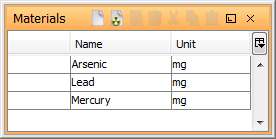
- Open the Materials window by selecting Window | Materials from the menu bar.
- Name the material by clicking in the Name column and writing “Arsenic”.
- In the unit column, enter “mg”.
- In the same way, create material for “Lead” and “Mercury”, assigning the same unit of “mg”.

Next
Previous
References
tutorial_2-vectorizing_the_model.txt · Last modified: by Boris Alfonso