
tutorial_3-creating_the_model_objects
Tutorial 3 - Creating the model objects
Page 2 of 4
In this lesson we will create the objects required for the turnover model. In the same way as in Tutorial 2-Creating a compartment model, you will use the Matrix window to create blocks in the Interaction matrix.
Creating blocks
- Open the Matrix window.
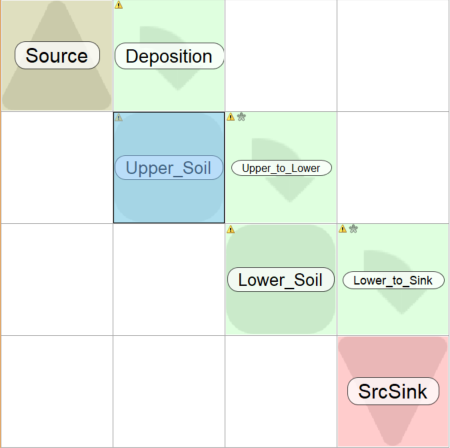
- Create the following objects, by right-clicking in the matrix and selecting objects from the pop-up menu. You can see the positions of the different objects in the picture below.
| Name | Type | Full name | Symbol | Image |
|---|---|---|---|---|
| Source | Source/Sink | Atmospheric Source | “media/Atmoshpere.jpg” | |
| Upper_Soil | Compartment | Upper soil layer | AUpper | “media/Soil 3.jpg” |
| Lower_Soil | Compartment | Lower soil layer | ALower | “media/Soil.gif” |
| Sink | Source/Sink | “sources/Drain.jpg” | ||
| Deposition | Transfer | Deposition transfer rate | ||
| Upper_to_Lower | Transfer | Perculation transfer rate coefficient | ||
| Lower_to_Sink | Transfer | Perculation transfer rate coefficient |
- When editing Deposition, make sure that the TC check-box in the Values tab is unchecked.
Creating parameters
Rather than specifying the initial conditions and transfer rate coefficients directly, we will create parameters for these values. This approach makes it possible to perform probabilistic analysis, sensitivity analysis and parameter optimization. It also makes it easier to enter and review the values.
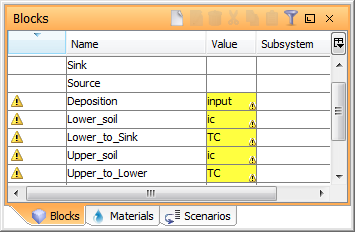
- Open the Blocks window. The table lists the seven blocks of the model. Enter the following value (initial condition/expression) for the Blocks. All the “Unknown values” are Parameters.
| Name | Value |
|---|---|
| Deposition | “input” |
| Lower_Soil | “ic” |
| Lower_to_Sink | “TC” |
| Upper_Soil | “ic” |
| Upper_to_Lower | “TC” |
Next
Previous
References
tutorial_3-creating_the_model_objects.txt · Last modified: by Boris Alfonso