
tutorial_-_time_events_-_monthly_max
Tutorial 6a - Time events - Monthly maximum
Page 2 of 4
A common request is to find the maximum value of an output. For this one can use the Min/Max block. However, in this experiment we will determine the maximum for each month of the simulation.
This means that we need to reset the Min/Max block every month. We will need the following:
- A Time point block which allows us to specify the first day of each month
- A Time event which will fire events based on the time point block
- A Min/Max block which records the soil concentration.
Create Time Point block
- In the Blocks windows, select to create a time point block
- Edit the block.
- In the Properties screen
- change the name to “Month_time_point”.
- In the Values screen
- Ensure that the Dimension is Scalar (No dependencies)
- Click the Settings button.
- Change the Mode to Day of month.
- Enter the value 1 as the Timepoint in the table, which indicates the 1st of each month.
- Close the window
Create Event block
- In the Blocks windows, select to create a time event block
- Edit the block.
- In the Properties screen
- change the name to “Month_event”.
- In the Values screen
- Ensure that the Dimension is Scalar (No dependencies)
- Select Month time point and click the > button.
- Close the window
Create Min/Max block
- In the Blocks windows, select to create a MinMax block
- Edit the block
- In the Properties screen, change the name to Monthly_max
- In the Values screen
- Enter the name Soil for the Target expression value
- Select Month_event for the Reset value
- Close the window
Run a simulation
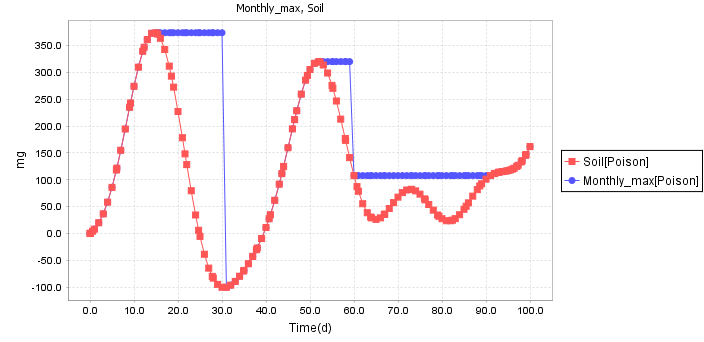
- Run a simulation, then plot Soil together with Monthly max.
- The plot should look like this:
You can download the solution here
See also
tutorial_-_time_events_-_monthly_max.txt · Last modified: by Boris Alfonso