File menu
The following options are available from the File menu.
- New Ctrl+N - Creates a new Project;
- Open, Ctrl+O - Open an existing project.
- Revert to saved, Ctrl+Shift+O, Revert to last saved version of the current project. That is, close the current project and re-open the file.
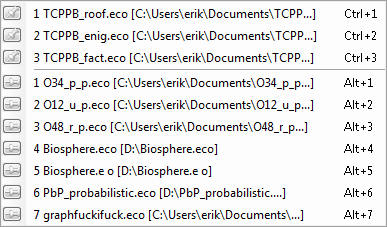 |
- Recent files – Contains a list of the recent files you have been working on. Recent projects can be opened directly by keeping the Alt key pressed and pressing the corresponding number indicated in the list. To the right of each recent file in the list is a button which allows you to “pin” the project. Pinned projects will remain in the top of the list until they are unpinned (by clicking on the pin button again).
- Close project - Closes the Active project.
- Save, Ctrl+S - Saves the active project to a file.
- Save As - Saves the active project to a file with a new name or to a new location.
- Save Assessment - Saves the active project including simulation results to a file. See assessment for more info.
- Project properties, Ctrl+F2 - Allows the user to change the name and write comments for the current project. See project properties.
- Categories - Manage categories for the current project.
- Glossary - Edit or Manage the glossary.
- Library
- Manage library… - Manage the module library.
- Synchronize with library… - Check the library for updates to the sub-systems in the current project.
- Add to library… - Add the currently selected sub-system to the library
- Get from library… - Import a sub-system from the library to the currently selected sub-system
- Export
- Export Blocks to Excel - Export blocks data to Excel. See Exporting and importing data.
- Export Blocks to Database - (Parameter Database Toolbox) Export blocks data to the database. See Exporting and importing data.
- Export data to JSON - Exports data to JSON. See Export data to JSON.
- Export Graph - Saves the graph as an image. Refer to Exporting and importing data.
- Export Matrix - Saves the matrix as an image. Refer to Exporting and importing data.
- Export Model - Saves the simulation model to an external location. Refer to Exporting and importing data.
- Export Results… - Export simulation results to a text or binary file. Refer to Exporting and importing data.
- Create lite report - Export part of model to a Word document, that can later be used in reports. Refer to Lite report
- Import
- Import Blocks from Excel - Import block data from Excel. See Exporting and importing data.
- Import Index-lists from Excel - Import index lists from Excel. See Exporting and importing data.
- Import data from JSON - Import data from JSON. See Import data from JSON.
- Import Blocks from Database - (Parameter Database Toolbox) Import block data from the database. See Exporting and importing data.
- Import Index-lists from Database - (Parameter Database Toolbox) Import index lists from the database. See Exporting and importing data.
- Import Radionuclides from Database - (Radionuclide Toolbox) Import radionuclides from the database. See Exporting and importing data.
- Import results… - Import simulation results from a text file or a binary file. See Exporting and importing data.
- Preferences - Allows you to change preferences such as the appearance of AFRY Intelligent Scenario Modelling and database settings. Please refer to Preferences.
- Exit - Quits AFRY Intelligent Scenario Modelling. You will be asked to save unsaved projects before exiting.